A Mac app. Through and through.
AppKit windows. System WebKit. Familiar shortcuts, trackpad gestures and native file dialogs. MDVu feels at home because it is built on the frameworks already on your Mac.
AppKit + WebKitMDVu is a fast, native Markdown viewer for macOS. Read .md files beautifully, from a simple README to diagrams, equations and a whole vault of ideas.
brew install --cask stpork/tap/mdvu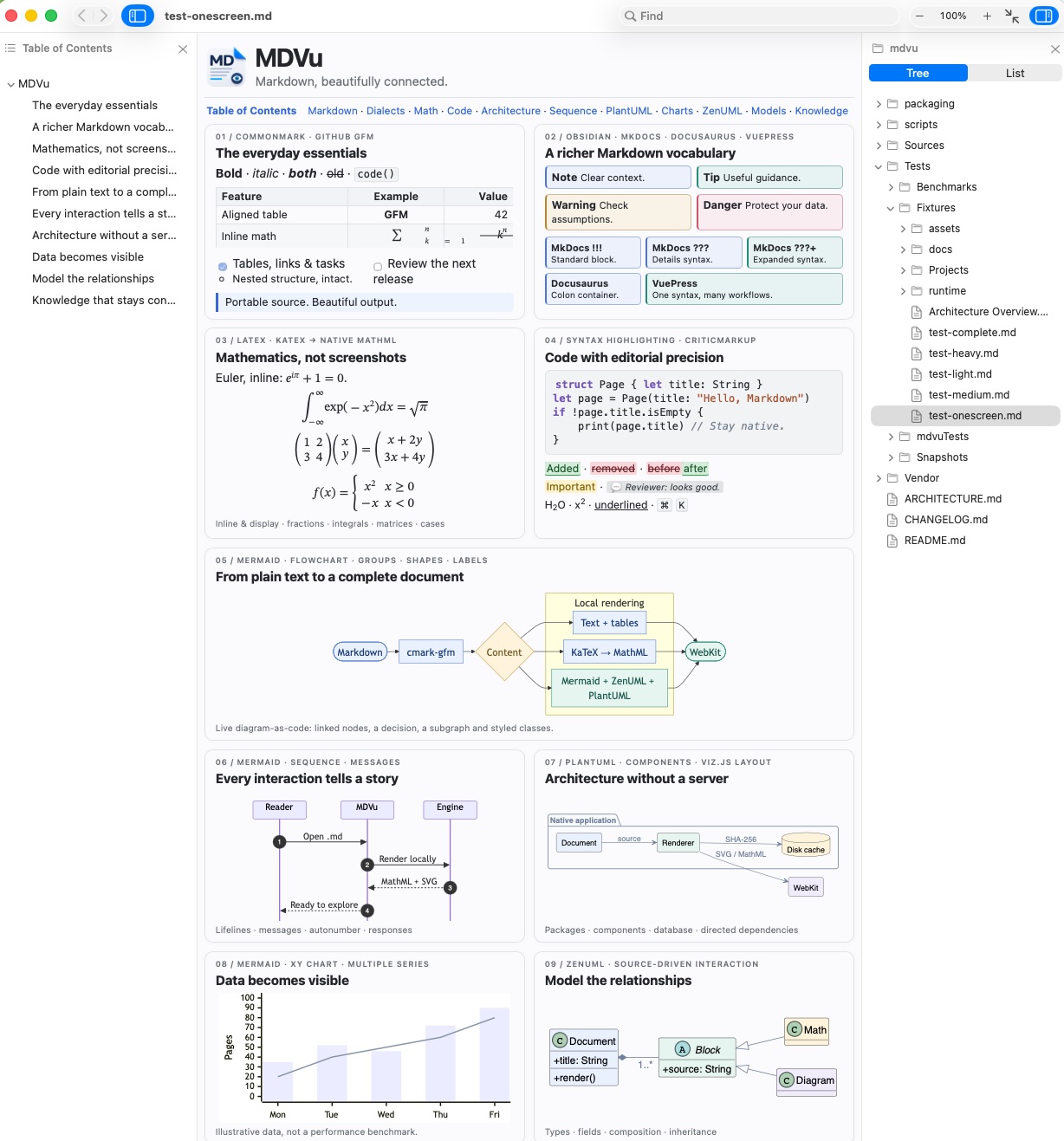
native app, engines included
to parse 1 MiB of Markdown¹
AppKit + your Mac’s WebKit
open source, MIT licensed
PURPOSEFULLY SMALL
Opening a document should be the easy part. MDVu brings rich rendering and a native Mac experience to a remarkably small app.
AppKit windows. System WebKit. Familiar shortcuts, trackpad gestures and native file dialogs. MDVu feels at home because it is built on the frameworks already on your Mac.
AppKit + WebKitAbout 3.4 MiB for the native app, including compressed diagram engines. No bundled Chromium, Node.js or JVM. Heavy renderers load only when your document needs them.
~3.4 MiBRead local documents without an account, upload or subscription. Math and diagrams render on your Mac. No telemetry in the app. Your workflow stays yours.
Local renderingRICH DOCUMENTS. ZERO SETUP.
Technical docs are more than headings and paragraphs. Read the diagram, understand the equation, follow the callout. The engines are already inside.
```mermaid
flowchart LR
  A[Your Markdown] --> B{MDVu}
  B --> C[Beautiful documents]
  B --> D[Local rendering]
```Architecture, sequences, charts and relationships. No diagram server. No Java install.
## A little mathematical beauty

Euler’s identity: $e^{i\pi} + 1 = 0$

$$
\int_{-\infty}^{\infty} e^{-x^2} dx
  = \sqrt{\pi}
$$Inline equations and display math, rendered with native WebKit MathML. No formula-font downloads.
> [!NOTE] Stay in context
> Your best ideas deserve a little space.

> [!TIP] Keep exploring
> Follow [[Architecture|the bigger picture]].Your best ideas deserve a little space.
Follow the bigger picture.
Familiar syntax, readable structure. Your notes keep their meaning when you open them here.
Illustrative syntax examples. See the actual MDVu rendering in the app screenshot above.
Tables, tasks, footnotes, autolinks and strikethrough. Powered by cmark-gfm.
Callouts, collapsible notes, wikilinks and media embeds.
Admonitions with !!!, ??? and ???+ syntax.
Fenced :::note, :::tip, :::warning and :::danger containers.
Additions, deletions, substitutions, highlights and review comments.
YAML frontmatter, GitLab TOC tokens, subscript, superscript and underline.
FAST, WITH THE RECEIPTS
A fast C parser at the core. Work starts while the app starts. Repeated diagrams come from a cache. Every layer is built to do less unnecessary work.
1 MiB of Markdown → parsed
¹ Recorded native arm64 run: median of five iterations after warmup, repeated test-light.md input. Parser only; excludes app launch, DOM rendering and diagram execution. Results vary by Mac and document. Not a competitor benchmark.
AT HOME IN YOUR WORKFLOW
Open a file, a project folder or an Obsidian vault. Follow the table of contents on the left and explore your files on the right. No importing. No new place to keep your work.
Light or dark. Readable width or edge to edge. Find, zoom from 10–500%, and move through history with a two-finger swipe.
Save a change and watch the preview update. Launch from Terminal, or render a Markdown file to a PNG with the snapshot command.
THE RIGHT TOOL FOR THE READ
Choose MDVu when the job is to open, understand and move through documents. You get rich technical rendering in a focused native app, without setting up a workspace or plugin stack.
| What matters | MDVu THE FOCUSED ONE | Obsidian | Typora | VS Code |
|---|---|---|---|---|
| Made for | Focused reading | Knowledge management | Writing & editing | Software development |
| Markdown + math | Built in | Built in | Built in | Built in |
| Mermaid | Built in · offline | Built in | Built in | Built in |
| PlantUML | Bundled · no Java | Via community plugins | Not documented¹ | Via extensions |
| App license / price | MIT · free | Proprietary · free | Proprietary · paid | Free · source: MIT² |
A feature comparison, not a speed ranking. Other tools offer broader editing or knowledge-management workflows. ¹ PlantUML is not listed in Typora’s official diagram guide. ² VS Code binaries have a Microsoft product license; the Code - OSS source is MIT. Features checked October 10, 2026.

MAKE ROOM FOR THE DOCUMENT
Small download. Rich documents. A little more joy
every time you open a Markdown file.
Already using Homebrew? Install the app and its command-line tool together.
brew install --cask stpork/tap/mdvuInstall with Homebrew, or open the DMG and drag MDVu into Applications.
Open a Markdown file or folder. That’s your setup.
v0.4.1 is ad-hoc signed. macOS may require first-launch approval. Installation notes ↗
A Markdown viewer displays plain .md files as formatted documents, with readable headings, tables, code and links. MDVu provides a native Markdown preview on macOS, including offline math and diagram rendering.
MDVu is an MD file viewer for .md, .markdown, .mdown and .mkd documents. Open a README, project documentation or a folder of notes directly from Finder or Terminal. The original Markdown files stay where they are.
MDVu is a dedicated viewer. Write in your favorite editor and keep MDVu beside it: the file watcher refreshes the document when you save. It is made for reading, reviewing and navigating Markdown.
macOS 13 Ventura or later, on Apple Silicon and Intel. The DMG contains a Universal app; architecture-specific ZIP archives are also available on GitHub Releases.
Markdown, math and the bundled diagram engines render locally without a server, account or Java installation. Remote images or other external resources referenced by a document can still use the network. MDVu itself has no telemetry.
Yes. Open a folder or a Markdown file inside your vault. MDVu recognizes .obsidian and .git roots and supports callouts, wikilinks and media embeds. It does not run Obsidian plugins or replicate every vault feature.
The v0.4.1 release is ad-hoc signed, not Apple-notarized. Gatekeeper may ask for an explicit first-launch approval. Download only from the project’s official releases, check the published SHA-256 checksum and follow the installation notes linked below.
Yes. MDVu is released under the MIT license, with no subscription or paid feature tier. Bundled third-party components retain their own licenses, listed in the repository.
Read the code. Report a bug. Make it better. A small app with room for your ideas.